
Medical Equipment Design Software: How SOLIDWORKS CAD, Simulation and PLM Accelerate Medical Device Development
Medical equipment manufacturers face a unique engineering challenge: products must be innovative, reliable, compact, manufacturable and thoroughly validated. From diagnostic equipment and patient monitoring systems to laboratory instruments and rehabilitation devices, every design decision can influence product performance, usability and development timelines.
So, what is the best medical equipment design software for modern product development?
Medical equipment design software combines 3D CAD, engineering simulation, visualization, data management and product lifecycle management to help engineering teams develop products more efficiently. SOLIDWORKS CAD, SOLIDWORKS Simulation, SOLIDWORKS Flow Simulation, electromagnetic simulation, SOLIDWORKS Visualize and PLM solutions can support different stages of the product development workflow.
For medical equipment manufacturers, the objective is not simply to create a 3D model. The real goal is to design, analyze, validate, visualize and manage the product before it reaches manufacturing.
This is where an integrated engineering workflow can make a difference.
SIMTEK, an authorized SOLIDWORKS reseller supporting engineering and manufacturing companies across Tamil Nadu and Kolhapur, helps organizations explore CAD, simulation, visualization and PLM solutions for product development.
What Is Medical Equipment Design Software?
Medical equipment design software is engineering software used to design, simulate, visualize and manage medical equipment and medical device products throughout their development lifecycle.
It typically includes capabilities for:
For manufacturers, combining these capabilities can help engineers identify potential design issues earlier, evaluate product performance digitally and reduce unnecessary design iterations.
Simulation-driven design is particularly relevant because engineers can evaluate structural, thermal, flow and electromagnetic behaviour before committing to every physical prototype. SOLIDWORKS describes this approach as a way to digitally validate designs, explore performance and address potential problems earlier in development.
Why Is Medical Equipment Design More Challenging Than Conventional Product Design?
Medical equipment often combines multiple engineering disciplines in a single product. A typical device may contain:
This means engineers may need to answer several questions simultaneously:
This is why medical equipment engineering software increasingly needs to support more than basic 3D modeling.
An integrated CAD and simulation workflow allows engineers to evaluate different aspects of a design earlier in the development process. Official SOLIDWORKS resources describe medical-device workflows involving structural, thermal, flow, fatigue and electromagnetic simulation, alongside 3D CAD and collaborative development.
How Is SOLIDWORKS Used in Medical Equipment Design?
SOLIDWORKS is used in medical equipment design for 3D CAD modeling, assembly development, simulation, visualization and product data management.Engineers can use SOLIDWORKS to develop:
The workflow can begin with a 3D CAD model and then extend into simulation, visualization and product data management. This creates a more connected development process where engineers can move from
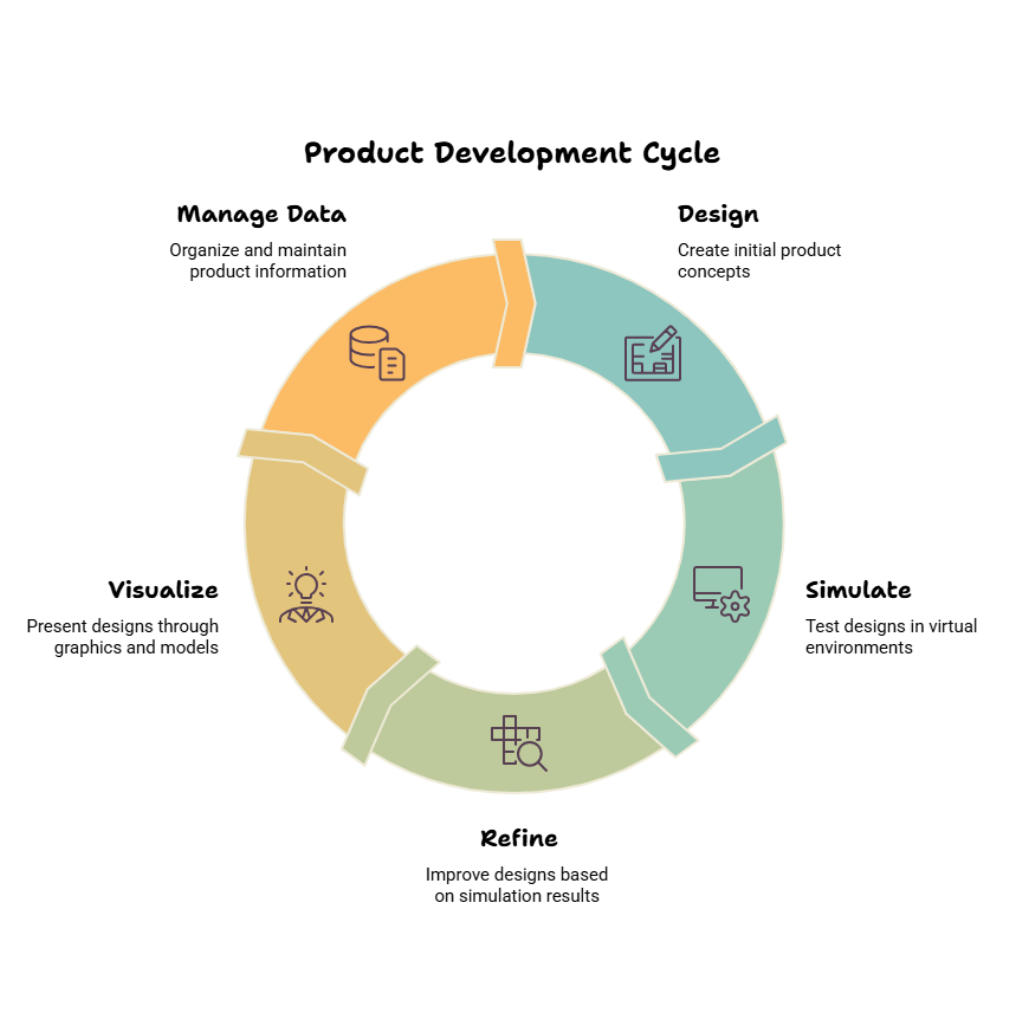
1. SOLIDWORKS CAD for Medical Equipment Design
At the centre of medical equipment product development is the 3D CAD model.
SOLIDWORKS CAD enables engineers to create parametric 3D models, assemblies and manufacturing documentation for complex products.
Medical equipment design often involves frequent changes. A housing may need to become smaller. A bracket may need to support additional loads. A component may need to move because of thermal constraints.
Parametric modeling helps engineers manage these design iterations more efficiently.
SOLIDWORKS CAD can support:
For medical equipment manufacturers, the benefit is the ability to develop a digital product model before moving into manufacturing.This digital model can then become the foundation for simulation and visualization.
2. SOLIDWORKS Simulation for Medical Device Engineering
SOLIDWORKS Simulation helps engineers evaluate how a product responds to mechanical loads before physical prototypes are manufactured.
Medical equipment can experience:
Structural simulation can help engineers investigate areas such as:
For example, an engineer developing a medical equipment frame may want to understand whether the structure can withstand expected operating loads.
Instead of relying exclusively on physical prototype iterations, simulation can provide early engineering insight into the digital design.
The result is not a replacement for physical validation. Instead, simulation becomes part of a broader engineering verification and validation strategy.
3. SOLIDWORKS Flow Simulation for Thermal and Fluid Analysis
Thermal management is becoming increasingly important as medical equipment becomes more compact and electronically sophisticated.
SOLIDWORKS Flow Simulation can help engineers study fluid flow, airflow and heat transfer within and around products.
Potential applications include:
For example, when electronic components generate heat inside a compact medical equipment enclosure, engineers need to understand how that heat moves through the system.
Questions may include:
Simulation can help engineers investigate these questions during design. SOLIDWORKS' own medical-device resources highlight applications involving fluid flow, thermal analysis and cooling, including medical equipment and oxygen-delivery applications.
4. Electromagnetic Simulation for Medical Equipment
Modern medical equipment increasingly combines mechanical and electronic systems.
This creates another engineering consideration:
electromagnetic behaviour.
Electromagnetic simulation can help engineers study:
This can be particularly relevant for equipment containing sensors, motors, coils and other electronic components.
However, simulation should be considered part of the engineering development process. It does not replace required physical testing, certification or formal EMC compliance procedures.
For complex medical equipment, combining mechanical CAD with electromagnetic analysis can provide engineers with earlier insight into potential design challenges.
5. SOLIDWORKS Visualize for Medical Equipment Visualization
Not everyone involved in product development reads engineering drawings or understands CAD models.
Product managers, hospital stakeholders, marketing teams, investors and customers may need to see what the product will look like.
SOLIDWORKS Visualize helps engineering teams create photorealistic product visuals from 3D CAD designs.
These visuals can be used for:
This means manufacturers can communicate product concepts visually before final production.
For medical equipment companies developing new products, this can make it easier to explain product form, appearance and design intent to non-engineering stakeholders.
6. PLM for Medical Equipment Product Development
As medical equipment becomes more complex, managing product information becomes increasingly important. A product may involve:
For medical equipment manufacturers, controlling the right version of product information is critical.
SOLIDWORKS healthcare and life-sciences resources also highlight data management, traceability and collaborative workflows as important elements of modern product development.
What Is the Benefit of Combining CAD, Simulation and PLM?
The biggest advantage is connected product development.
Instead of treating CAD, simulation, visualization and product data as completely separate activities, manufacturers can create a more integrated workflow.
A typical workflow looks like this:
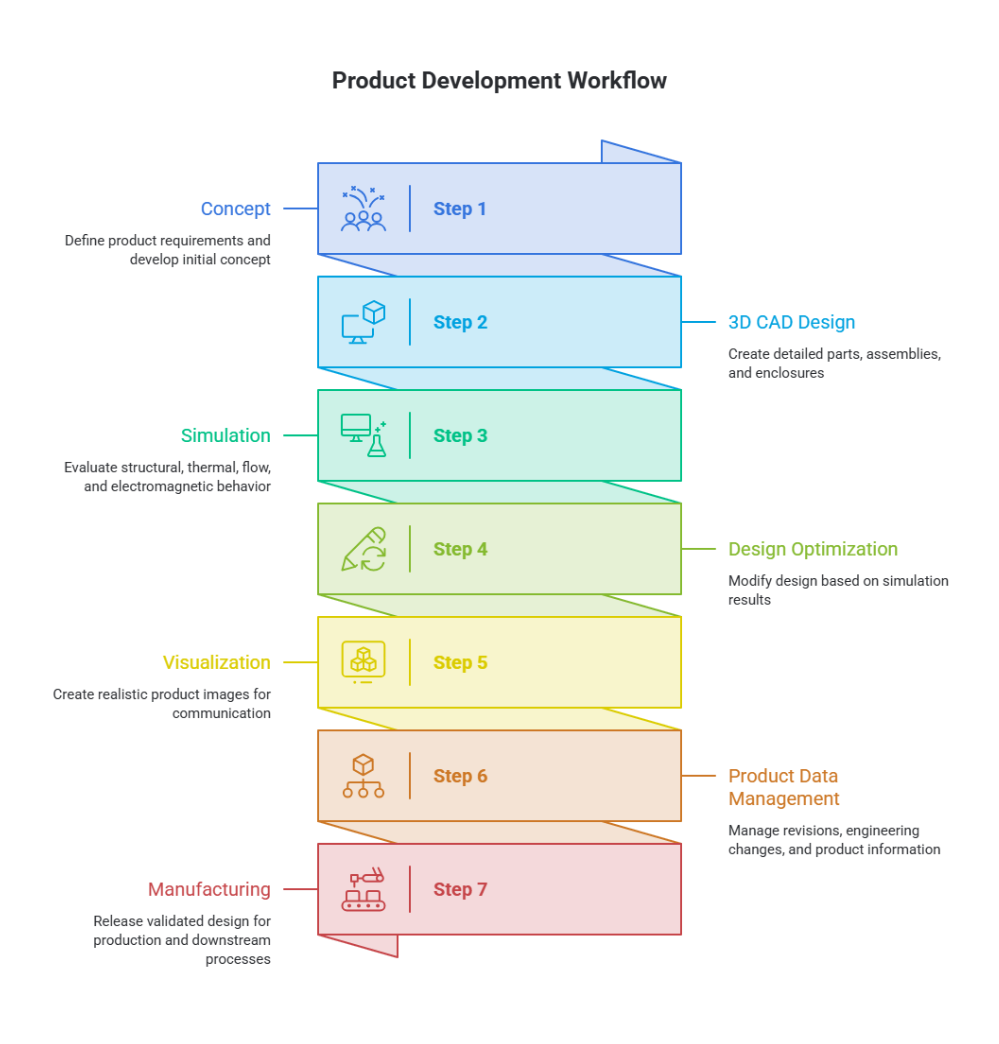
This approach can help organizations identify potential issues earlier and reduce unnecessary iterations.
SOLIDWORKS positions simulation-driven design as a way to digitally validate performance, address potential downstream issues and reduce dependence on physical prototype cycles.
How Can Simulation Reduce Physical Prototypes?
Simulation does not eliminate physical prototypes, but it can help reduce unnecessary prototype iterations. Engineers can use simulation to compare design alternatives before building every physical version.
For example, a medical equipment manufacturer could digitally evaluate:
The most promising designs can then move forward for physical testing and validation. This creates a simulation-driven design loop:
The objective is to identify potential problems earlier, when design changes are generally easier and less expensive to implement.
SOLIDWORKS case material describes simulation-driven workflows as supporting earlier validation and helping reduce physical prototype requirements, while emphasizing that simulation works alongside physical testing and validation.
Medical Equipment Design Software: Which Capabilities Should You Look For?
SOLIDWORKS for Medical Equipment: Who Can Benefit?
SOLIDWORKS-based engineering workflows may be relevant to organizations developing:
The exact software combination should depend on the product's engineering requirements.
For example:
Mechanical equipment may prioritize CAD and structural simulation.
Electronics-heavy equipment may require thermal and electromagnetic analysis.
Fluid-based equipment may benefit from flow and thermal simulation.
Growing organizations may require stronger PDM or PLM capabilities.
Why Choose an Integrated Medical Equipment Engineering Workflow?
SOLIDWORKS Medical Equipment Solutions in Tamil Nadu and Kolhapur
Medical equipment manufacturers and engineering organizations in Tamil Nadu and Kolhapur can benefit from working with an experienced engineering software partner who understands both software capabilities and real-world product development requirements.
SIMTEK supports organizations looking to explore:
Whether you are designing a new medical equipment product, improving an existing product or looking to introduce simulation-driven design into your engineering workflow, the right software combination depends on your product and engineering requirements.
SIMTEK is an authorized SOLIDWORKS reseller supporting customers across Tamil Nadu and Kolhapur.
Frequently Asked Questions About Medical Equipment Design Software
Conclusion: Building Better Medical Equipment Through Connected Engineering
Medical equipment development requires more than creating a precise 3D model.
Engineers need to understand how a product will perform, how it will manage heat and airflow, how its components may interact electromagnetically, how it will look when manufactured and how its product information will be managed throughout its lifecycle.
That is why a connected approach combining SOLIDWORKS CAD, structural simulation, Flow Simulation, electromagnetic simulation, Visualize and PLM can provide a strong foundation for modern medical equipment product development.
The goal is simple:
Design better. Validate earlier. Communicate clearly. Manage product data effectively.
For medical equipment manufacturers in Tamil Nadu and Kolhapur, SIMTEK can help evaluate the right SOLIDWORKS solutions for your engineering workflow.
Ready to explore SOLIDWORKS for your medical equipment design process? Talk to SIMTEK about your product development requirements.