
Simplify Electrical Design with Intelligent BOM Navigation
In today’s rapidly evolving electrical design environment, speed and accuracy are critical for successful project delivery. Engineers are expected to manage increasingly complex systems while reducing design cycles, minimizing errors, and maintaining high-quality documentation.
Yet, many engineering teams still spend valuable time performing repetitive manual tasks such as:
These small inefficiencies accumulate quickly, slowing down projects and increasing the risk of costly mistakes.
This is where intelligent BOM navigation in SOLIDWORKS Electrical transforms the workflow.
Instead of functioning as a static list, the Bill of Materials becomes an interactive engineering tool that connects schematics, components, reports, and documentation into one seamless environment.
What is Intelligent BOM Navigation?
Traditional Bills of Materials are static documents. They provide component lists but lack connectivity to the actual design environment. Engineers often need to manually search through multiple drawings to locate a component or verify its specifications.
Intelligent BOM navigation changes this completely.
It creates a smart and connected workflow where every BOM entry becomes interactive and traceable throughout the design process.
With intelligent BOM navigation, engineers can:
The Growing Complexity of Electrical Design
Modern electrical projects are more sophisticated than ever before. Engineers now manage:
As project complexity grows, locating the correct component becomes increasingly difficult.Even a few minutes wasted searching through drawings can create delays during:
Manual workflows also introduce additional risks:
Intelligent BOM navigation eliminates these bottlenecks by centralizing component access and simplifying navigation throughout the design environment.
Key Features That Make Intelligent BOM Navigation Powerful
Interactive Component Navigation
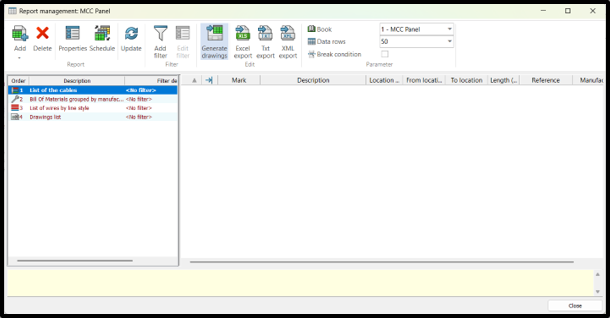
One of the most valuable capabilities is the ability to navigate directly from the BOM to the exact schematic location of a component.
Instead of manually searching through pages of drawings, engineers can simply click a BOM entry and immediately open the related schematic section.
Benefits
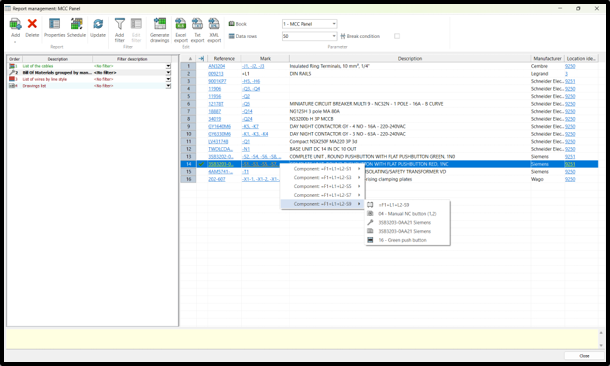
Multiple Components in One BOM Cell
Intelligent BOM systems can group identical components into a single organized entry rather than displaying repetitive rows.
This creates cleaner documentation and improves readability for engineers, procurement teams, and manufacturing departments.
Benefits
Instant Access to Manufacturer Data
Engineers can directly access:
This eliminates the need to manually search external databases or websites.
Benefits
Smart Component Selection
When multiple identical components exist in a project, intelligent BOM navigation enables precise component selection through dropdown navigation and linked references.
This ensures engineers always access the correct component instance.
Benefits
Interactive Reports and PDFs
Even after exporting reports to PDF, intelligent BOM links remain interactive and clickable.
This allows teams outside the design department to quickly navigate documentation without requiring direct access to the CAD environment.
Benefits
Extended Benefits for Engineering Teams
Improved Design Consistency
Centralized BOM intelligence ensures all project documentation remains synchronized across schematics, reports, and component databases.
Faster Design Reviews
Reviewers can instantly validate component locations without manually tracing circuits across drawings.
Better Collaboration Across Departments
Design, procurement, manufacturing, and maintenance teams can work from the same connected documentation system.
Reduced Rework and Engineering Errors
Interactive navigation minimizes incorrect component selections and outdated references.
Enhanced Scalability
Whether designing small panels or enterprise-scale industrial systems, intelligent BOM workflows scale efficiently with project complexity.
Real-World Use Case
Imagine a large industrial control panel containing dozens of identical relays distributed across multiple schematic sheets.
This process:
With Intelligent BOM Navigation
All relay components appear under a single organized BOM entry.
Engineers can:
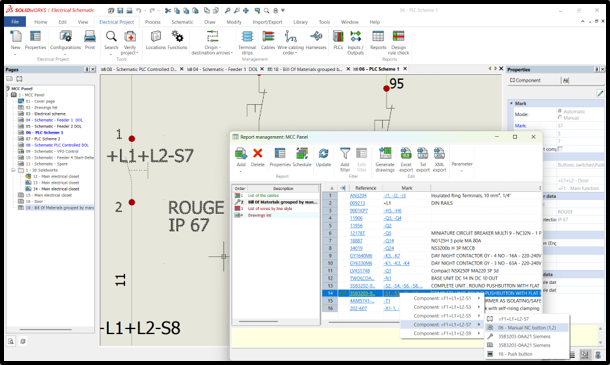
The result is a dramatically faster and more reliable workflow.
Before vs After
Industry Applications
Manufacturing
Accelerates electrical panel documentation and assembly preparation.
Industrial Automation
Simplifies PLC systems, I/O modules, and control architecture management.
Energy & Utilities
Improves traceability for large-scale electrical infrastructure projects.
OEM Machine Building
Enhances component standardization and project scalability.
Process Industries
Supports accurate documentation for complex automation systems.
Why Intelligent BOM Navigation Matters
This capability is far more than a convenience feature.
It fundamentally changes how engineers interact with electrical design data.
By embedding intelligence directly into the BOM, organizations can:
Most importantly, engineers spend less time searching and more time designing.
Final Thoughts
Intelligent BOM navigation in SOLIDWORKS Electrical represents a major advancement in modern electrical engineering workflows.
By transforming the BOM into an interactive, connected, and intelligent system, engineering teams can: