
SOLIDWORKS Visualize for Medical Device Manufacturing
From CAD Models to Photorealistic Product Visualization Before Manufacturing
Bring Your Medical Product to Life Before Manufacturing
Medical equipment manufacturers spend significant time designing, engineering, testing, and developing products. But before a medical device reaches the manufacturing floor, product teams often need to answer an important question: What will the final product actually look like?
This is where SOLIDWORKS Visualize can help. As professional 3D rendering software, SOLIDWORKS Visualize transforms 3D CAD models into photorealistic product images, animations, and visual presentations.
For medical device manufacturers, this creates an effective way to visualize product appearance, explore different materials and configurations, communicate design concepts, and prepare marketing visuals before physical production.
From Engineering Data to Product Visualization
SOLIDWORKS Visualize helps connect the engineering design process with product presentation, customer communication, sales, and marketing.
What Is SOLIDWORKS Visualize?
SOLIDWORKS Visualize is professional product rendering software designed to create high-quality, photorealistic images and animations from 3D CAD models.
Designers and engineers can visualize materials, colors, textures, lighting, reflections, cameras, and environments to create realistic representations of products before they are physically manufactured.
This makes SOLIDWORKS Visualize valuable as CAD rendering software, as well as photorealistic rendering software for product designers and engineers.

One CAD Model. Endless Visualization Possibilities.
Convert engineering CAD data into high-quality product visuals for design reviews, customer presentations, marketing campaigns, and product launches — even before manufacturing begins.
Why 3D Product Visualization Matters in Medical Equipment Manufacturing
Medical equipment can contain complex assemblies, displays, controls, plastics, metals, glass, rubber components, and specialized surface finishes.
While conventional CAD models are essential for engineering, they may not immediately communicate the final appearance of a product to management, customers, sales teams, or marketing professionals.
3D product visualization helps bridge this communication gap by presenting a realistic representation of the proposed medical device.
What Medical Products Can You Visualize?
SOLIDWORKS Visualize can help manufacturers create realistic product visuals across a wide range of healthcare and medical equipment applications.
Diagnostic Equipment
Visualize patient monitoring systems, diagnostic instruments, ultrasound equipment, analyzers, imaging equipment, and other diagnostic devices.
Surgical Equipment
Create realistic visuals of surgical instruments, operating room equipment, surgical tables, medical carts, and related healthcare systems.
Patient-Care Equipment
Present hospital beds, wheelchairs, patient monitors, infusion equipment, rehabilitation products, and other patient-care solutions.
Dental & Laboratory Equipment
Visualize dental chairs, delivery systems, imaging equipment, laboratory analyzers, centrifuges, and sample-handling equipment.
For medical equipment manufacturers: SOLIDWORKS Visualize provides a practical CAD-to-photorealistic image workflow for communicating product appearance before manufacturing.
How Does SOLIDWORKS Visualize Help Medical Device Manufacturers?
SOLIDWORKS Visualize helps medical device manufacturers turn existing CAD models into realistic product visuals that can be used for design reviews, customer presentations, product communication, and marketing.
Instead of waiting for a physical product to be manufactured and photographed, teams can create realistic visualizations during the development stage.
Key Advantage
Manufacturers can visualize product appearance earlier, communicate design concepts more effectively, and prepare professional product imagery from existing CAD data.
Ready to Visualize Your Medical Equipment?
Turn your 3D CAD models into professional product visuals and discover how SOLIDWORKS Visualize can support your medical equipment design, presentation, and marketing workflow.
Request a Quote10 Ways SOLIDWORKS Visualize Helps Medical Device Manufacturers
Create photorealistic product visuals, explore design options, and visualize medical equipment before manufacturing.
Why Medical Manufacturers Need Photorealistic Product Visualization
Medical equipment can include complex assemblies, detailed enclosures, displays, controls, plastics, metals, glass, rubber components, and specialized surface finishes.
Traditional CAD models are essential for engineering, but technical CAD views may not always communicate the final appearance of a product to customers, management teams, sales professionals, or marketing teams.
3D product visualization bridges this gap by transforming engineering CAD data into realistic product imagery that is easier to understand, review, and present.
10 Ways SOLIDWORKS Visualize Can Help Medical Equipment Manufacturers
Create Photorealistic Medical Device Renderings
SOLIDWORKS Visualize works as professional photorealistic rendering software that can transform CAD models into realistic medical equipment images. Manufacturers can visualize plastics, metals, glass, displays, rubber, textures, reflections, and surface finishes.
Render Products Before Manufacturing
Professional 3D rendering software allows manufacturers to render products before manufacturing. Teams can explore product appearance digitally before investing in physical appearance prototypes.
Explore Colors, Materials and Finishes
Designers can evaluate different colors, plastics, metallic surfaces, glass, rubber, textures, and finishes to understand how the final medical product could appear under realistic lighting conditions.
Use 3D Rendering as a Product Photography Alternative
When a medical device has not yet been manufactured, 3D rendering can provide a product photography alternative. CGI product photography and virtual photography can help create marketing visuals directly from CAD data.
Visualize Medical Devices in Real Environments
Place medical equipment in realistic environments such as hospitals, operating rooms, dental clinics, diagnostic centers, laboratories, and patient-care areas to demonstrate how the product could look in its intended application.
Improve Product Design Reviews
Realistic visuals help engineering and management teams discuss product appearance, proportions, materials, configurations, and finishes using a common visual reference.
Support Customer and Sales Presentations
Replace basic CAD screenshots with high-quality product visuals that help sales teams demonstrate proposed medical equipment to customers, distributors, hospitals, and other stakeholders.
Visualize Different Product Configurations
Present different product configurations, accessories, colors, handles, control panels, mounting options, and finishes without producing every visual variation physically.
Prepare Marketing Assets Before Product Launch
Create realistic visuals for websites, brochures, catalogs, datasheets, presentations, social media campaigns, trade shows, and product launch materials before the finished product reaches the market.
Reduce Dependence on Appearance Prototypes
Physical prototypes remain important for engineering evaluation, but visual concepts can often be explored digitally. Compare colors, materials, finishes, and configurations before producing multiple physical appearance samples.
Render Medical Products Before Manufacturing
Can medical equipment be rendered before manufacturing? Yes. SOLIDWORKS Visualize enables designers and engineers to create realistic product visuals from CAD data while the physical product is still under development.
This can be particularly useful for medical device companies that need to review product appearance, present concepts to customers, or prepare marketing campaigns before production.
Example: Patient Monitoring Device
A manufacturer developing a patient monitoring device can create multiple visual versions with different housing colors, materials, display treatments, and surface finishes before selecting the preferred design direction.
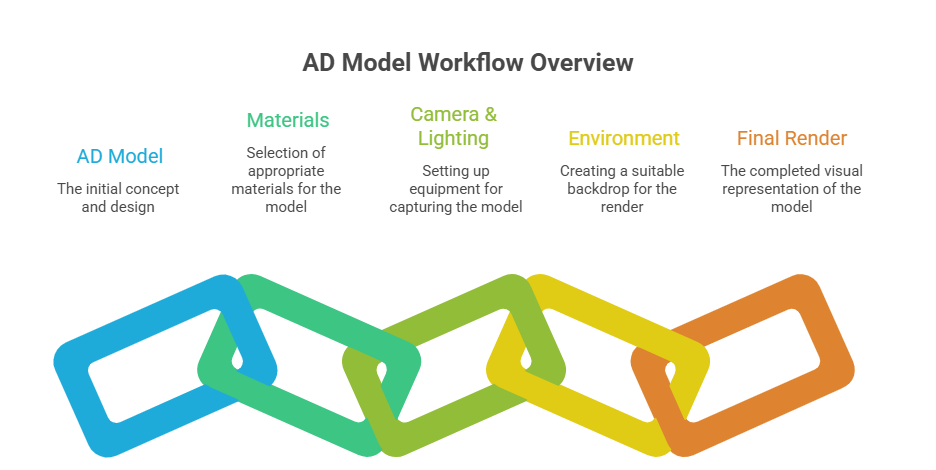
From CAD to Photorealistic Product Visualization
SOLIDWORKS Visualize provides a practical workflow for turning engineering CAD data into professional product imagery. Designers can work with realistic materials, lighting, cameras, and environments to create visuals suitable for technical presentations and marketing.
This CAD to photorealistic image workflow can help medical equipment manufacturers communicate product concepts clearly throughout the product development process.
Why It Matters
Instead of waiting until a physical product is available for photography, teams can prepare realistic visual assets directly from their CAD models.
Visualize Your Medical Product Before Manufacturing
Discover how SOLIDWORKS Visualize can help your medical equipment business create photorealistic renders, explore product designs, and communicate products more effectively.
Request a QuoteCreate Photorealistic Medical Product Visuals Before Manufacturing
Turn engineering CAD models into realistic images, animations, and product presentations with SOLIDWORKS Visualize.
From CAD Data to CGI Product Photography
Medical equipment manufacturers often need high-quality product images for websites, brochures, catalogues, presentations, exhibitions, and sales campaigns.
But what happens when the product is still under development? Traditional photography requires a physical product, a suitable location, professional equipment, and a photography setup.
With SOLIDWORKS Visualize, manufacturers can create CGI product photography directly from their 3D CAD models. This makes digital product photography and virtual photography possible even before the first production unit is available.
Product Photography Alternative
When a physical medical device is not yet available, photorealistic rendering can act as a practical product photography alternative for product communication and marketing.
How to Make Photorealistic Renders of Medical Devices
Creating a realistic medical product render involves more than simply importing a CAD model. The visual quality depends on materials, lighting, camera positioning, environments, and presentation details.
SOLIDWORKS Visualize provides a powerful workflow for transforming engineering CAD data into realistic product visuals. Designers and engineers can control the appearance of materials, lighting, environments, cameras, and other visual elements to create professional-quality renders.

From CAD Model to Photorealistic Product Image
By combining engineering CAD data with realistic materials, professional lighting, camera positioning, and environments, medical equipment manufacturers can create compelling product visuals before physical manufacturing begins.
Create Realistic Materials, Lighting and Environments
Medical products commonly use combinations of plastics, metals, rubber, glass, transparent components, screens, buttons, and textured surfaces. Showing these materials realistically can make a major difference in product presentation.
Realistic Materials
Visualize different plastics, metals, glass, rubber, coatings, textures, and surface finishes to communicate the intended product appearance.
Professional Lighting
Use lighting and environments to create realistic highlights, reflections, shadows, and depth across medical equipment.
Camera Composition
Select camera angles and viewpoints that clearly communicate important product features, controls, interfaces, and overall product form.
Realistic Environments
Present medical products in environments such as hospitals, laboratories, clinics, operating rooms, or clean professional product studios.
Visualize Your Medical Product From Every Angle
A single product image may not always be enough to communicate the design of complex medical equipment. Multiple camera views, animations, and interactive presentations can provide a more complete understanding of the product.
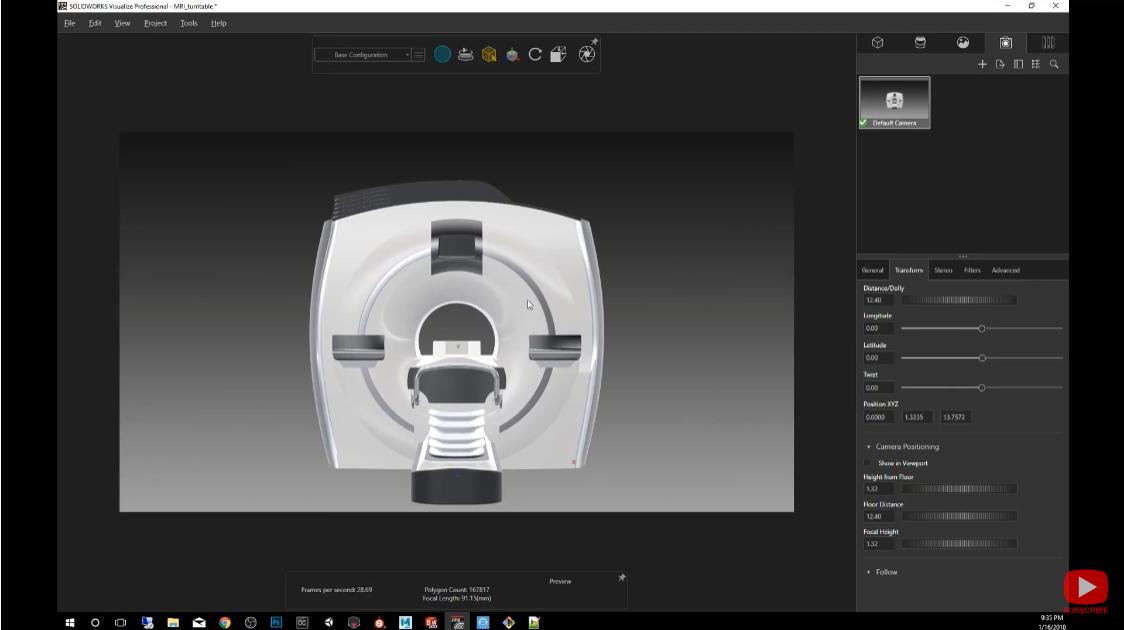
360° Product Visualization for Medical Equipment
Manufacturers can create multiple product views to demonstrate the equipment from different angles. This approach is particularly useful when customers need to understand the complete external form of a medical device.
A 360 product spin or product animation can showcase front, rear, side, top, and other important views without requiring multiple physical photography sessions.
Why 360° Visualization Helps
Customers can understand product form and design details more clearly when they can see the product from multiple perspectives.
3D Rendering vs Product Photography
Both professional photography and 3D rendering have their own applications. The right approach depends on the product development stage and the type of visual content required.
Traditional Product Photography
- Requires a physical product
- Requires photography setup
- Product must be available
- Changes may require another photo session
3D Product Rendering
- Can be created before manufacturing
- Uses existing CAD data
- Materials and colors can be changed digitally
- Multiple views can be generated
What is the cost of product photography vs CGI? The answer depends on the number of products, photography requirements, physical prototypes, locations, revisions, and the required visual assets. For products still in development, 3D rendering can provide a flexible way to create visuals without waiting for physical production.
Where Can Medical Manufacturers Use 3D Product Renders?
Website & E-Commerce
Create professional product visuals for websites, online catalogues, digital brochures, and e-commerce product pages.
Sales Presentations
Help sales teams communicate product appearance and configurations to hospitals, distributors, dealers, and customers.
Marketing Campaigns
Prepare high-quality visuals for brochures, advertisements, social media, product launches, and digital campaigns.
Trade Shows & Exhibitions
Showcase products through large-format renders, displays, presentations, and promotional materials even before production is complete.
Turn Your CAD Models Into Photorealistic Product Visuals
Discover how SOLIDWORKS Visualize can help your medical equipment business create professional renders, virtual photography, product animations, and marketing visuals before manufacturing.
Request a QuoteAccelerate Medical Product Communication with SOLIDWORKS Visualize
Create professional product visuals, animations, and marketing content from your CAD data — before your medical equipment reaches production.
Why Medical Equipment Manufacturers Should Use 3D Visualization
For medical equipment manufacturers, a product is not finished when the CAD model is completed. The design must also be communicated to customers, sales teams, distributors, marketing departments, and other stakeholders.
High-quality visualization makes this communication easier by showing what the final product can look like before a physical prototype or production unit is available.
With SOLIDWORKS Visualize, companies can transform engineering data into professional visual content without rebuilding the product in a separate visualization workflow.
Visualize Before You Manufacture
Render products before manufacturing to communicate design concepts, product appearance, materials, configurations, and presentation ideas at an earlier stage.
Key Benefits of SOLIDWORKS Visualize for Medical Manufacturers
Communicate Designs Clearly
Photorealistic visuals can make complex medical equipment easier to understand for customers, management, sales teams, and non-technical stakeholders.
Support Faster Design Reviews
Explore different materials, colors, finishes, environments, and product configurations visually before committing to physical production.
Reduce Dependence on Physical Photography
Create professional product visuals directly from CAD data, reducing the need to wait for a physical product before preparing certain marketing assets.
Create Marketing-Ready Content
Generate high-quality images for brochures, websites, presentations, advertisements, exhibitions, and digital marketing campaigns.
Present Multiple Product Configurations
Show different product colors, finishes, components, and configurations without producing a separate physical prototype for every visual variation.
Improve Customer Engagement
Use realistic product imagery and animations to create stronger presentations and help customers understand the product visually.
Go Beyond Static Images with Product Animation
Some medical equipment contains multiple components, moving mechanisms, interfaces, or operational features that are difficult to explain with a single image.
SOLIDWORKS Visualize can support visual storytelling through product animations and camera movements. This makes it useful as 3D animation software for products when manufacturers need to communicate product form, features, or presentation concepts.
Show More Than a Product Image
Use product animations to present different viewpoints, component relationships, product configurations, and visual demonstrations in a more engaging format.
Create Visual Content for Every Stage of the Product Journey
From early design presentations to product launches, realistic visualization can support multiple stages of the medical equipment product lifecycle.
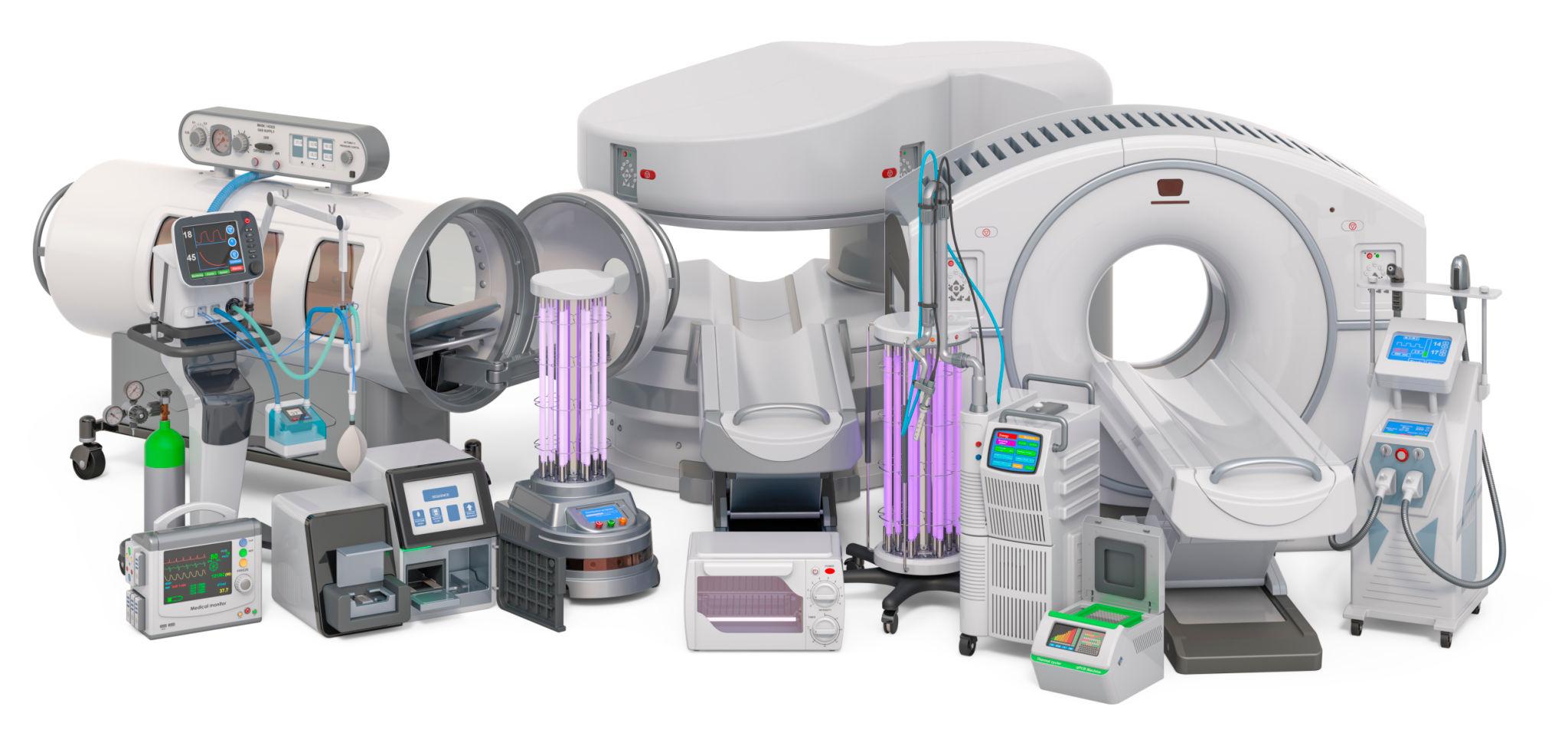
Where Can These Visuals Be Used?
Is SOLIDWORKS Visualize Useful for Medical Device Manufacturers?
Yes. SOLIDWORKS Visualize can be useful for medical device and equipment manufacturers that need realistic product images, animations, and presentations from their existing 3D CAD data.
It can support product visualization during design reviews, customer presentations, sales activities, marketing campaigns, website development, and product launches.
Can You Render a Medical Product Before Manufacturing?
Yes. If a suitable 3D CAD model is available, SOLIDWORKS Visualize can be used to create realistic product visuals before the physical product is manufactured. This can help teams communicate product appearance earlier and prepare visual content ahead of a product launch.
From Engineering CAD to Marketing-Ready Visuals
Medical equipment manufacturers need more than technically accurate designs. They also need to communicate the product clearly and professionally.
SOLIDWORKS Visualize bridges the gap between engineering design and product presentation by helping transform CAD models into realistic images, animations, and visual content.
Whether you need photorealistic rendering software, CAD rendering software, virtual photography, product animations, or visuals for e-commerce and marketing, SOLIDWORKS Visualize can become an important part of your product communication workflow.
Frequently Asked Questions About SOLIDWORKS Visualize
Here are some common questions medical equipment manufacturers, product designers, and engineers ask about SOLIDWORKS Visualize and 3D product rendering.
What is SOLIDWORKS Visualize?
SOLIDWORKS Visualize is a 3D visualization and rendering solution that helps designers and engineers create photorealistic images, animations, and presentations from 3D CAD models.
How does SOLIDWORKS Visualize help medical equipment manufacturers?
It helps medical equipment manufacturers turn CAD models into realistic product visuals for design reviews, sales presentations, brochures, websites, exhibitions, product launches, and marketing campaigns.
Can SOLIDWORKS Visualize render medical devices before manufacturing?
Yes. Manufacturers can create realistic renders from available 3D CAD models before a physical prototype or production unit is manufactured.
Can SOLIDWORKS Visualize create photorealistic product images?
Yes. SOLIDWORKS Visualize can be used to create photorealistic product images by combining CAD geometry with materials, lighting, environments, camera settings, and rendering techniques.
Can I use SOLIDWORKS Visualize as CAD rendering software?
Yes. SOLIDWORKS Visualize can be used as CAD rendering software to transform engineering CAD models into high-quality visual outputs for technical and commercial presentations.
Can SOLIDWORKS Visualize be used for product marketing?
Yes. Product designers and marketing teams can use rendered images for websites, brochures, advertisements, catalogues, social media, presentations, exhibitions, and promotional materials.
Can SOLIDWORKS Visualize replace product photography?
3D rendering can serve as a product photography alternative when a physical product is not yet available. It can also complement traditional photography by providing additional views and visual variations.
What is the difference between 3D rendering and product photography?
Product photography captures a physical product using a camera, while 3D rendering creates a visual representation from digital 3D data. Rendering can be particularly useful when a product is still in development.
Can SOLIDWORKS Visualize create 360° product views?
Yes. Multiple rendered views and animations can be used to communicate a product from different angles. This can be useful for 360° product visualization and interactive product presentation content.
Can SOLIDWORKS Visualize create product animations?
Yes. SOLIDWORKS Visualize supports product visualization workflows that can be used to create animations and communicate product form, movement, viewpoints, and presentation concepts.
Can rendered images be used for e-commerce products?
Yes. High-quality rendered images can be used for e-commerce product pages, online catalogues, websites, digital brochures, and other online product presentations.
How can I create photorealistic renders from a CAD model?
A typical workflow involves importing the CAD model, assigning realistic materials, setting up lighting and environments, positioning the camera, and generating the final render.
Is SOLIDWORKS Visualize useful for product designers and engineers?
Yes. It can help product designers and engineers communicate design concepts, evaluate visual appearance, prepare presentations, and create marketing-ready product imagery from their CAD data.
Can SOLIDWORKS Visualize help reduce the need for physical prototypes?
Visualization does not replace functional prototypes or engineering validation. However, it can reduce the need to create physical samples solely for certain visual presentations.
Is SOLIDWORKS Visualize suitable for medical product marketing?
Yes. Medical equipment companies can use high-quality product renders for marketing campaigns, product launches, brochures, websites, sales presentations, exhibitions, and digital content.
Ready to Transform Your Medical CAD Models?
Explore how SOLIDWORKS Visualize can help your medical equipment business create photorealistic product renders, animations, virtual photography, and marketing visuals before manufacturing.
Request a Quote