
SOLIDWORKS 2026 AI – Assembly Optimization
SOLIDWORKS 2026 introduces AI-powered Assembly Optimization through the LEO Mechanical Designer. This feature analyzes large assemblies, identifies performance bottlenecks, and recommends practical actions to reduce rebuild time, simplify assembly structure, and improve overall CAD performance. It helps engineers spend less time troubleshooting and more time designing.
What's New in SOLIDWORKS 2026 AI
Assembly Optimization
Assembly Optimization analyzes the active assembly and provides recommendations to improve rebuild speed and assembly efficiency. The AI identifies heavy components, mate complexity, and rebuild bottlenecks before suggesting optimization techniques.
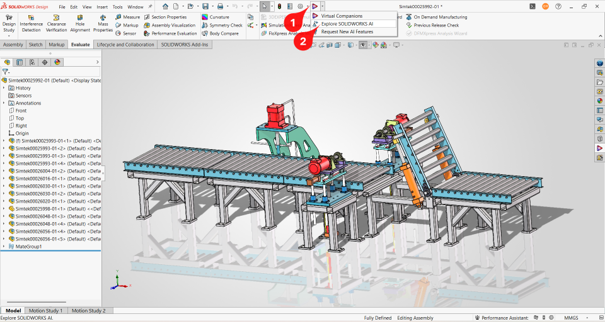
Step 1 – Launch SOLIDWORKS AI
Open Explore SOLIDWORKS AI from the toolbar and launch LEO Mechanical Designer.
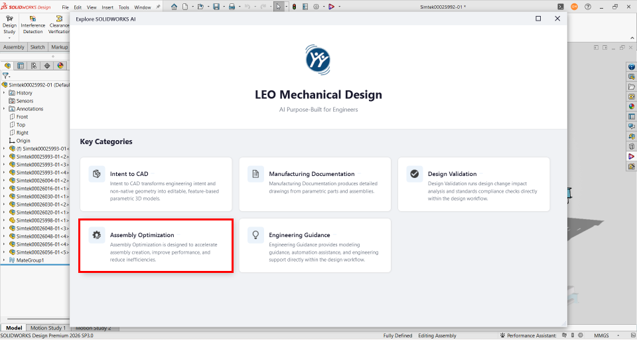
Step 2 – Select Assembly Optimization
Choose the Assembly Optimization category. Prompt templates such as 'Why is my assembly slow?' are available.
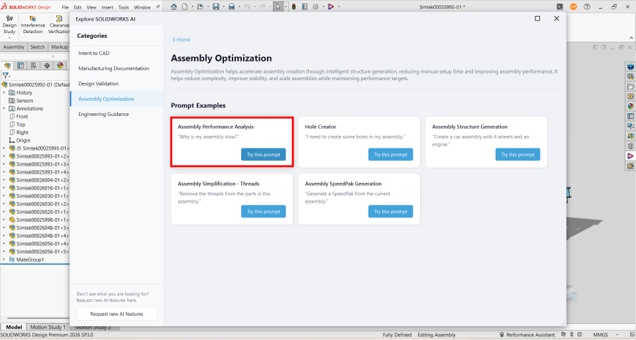
Step 3 – Run AI Analysis
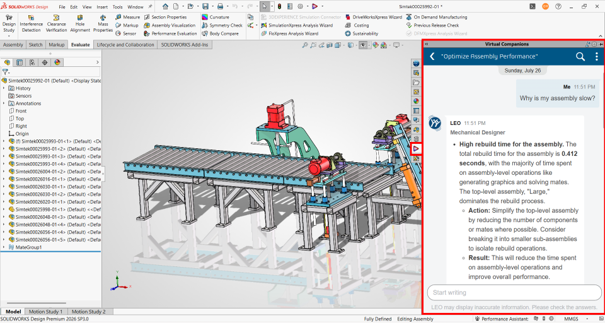
Ask the AI to analyze assembly performance. It evaluates rebuild time, mates, graphics generation and assembly structure.
Step 4 – Review AI Recommendations
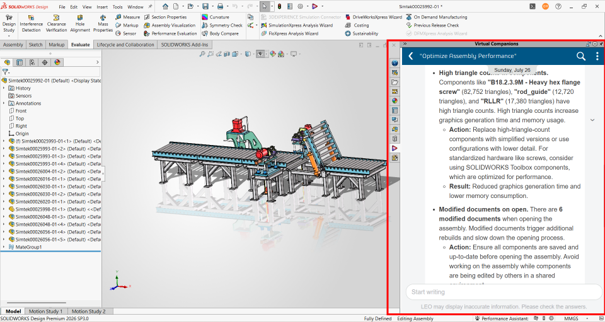
Read the recommendations. In the example, AI reports a rebuild time of 0.412 seconds and suggests simplifying the top-level assembly by reducing components or mates and breaking it into subassemblies.
Step 5 – Apply Optimization
Implement the recommendations, rebuild the assembly and validate the performance improvement.
Key Benefits
Best Use Cases
Conclusion
Assembly Optimization is one of the most practical AI enhancements in SOLIDWORKS 2026. Instead of manually investigating rebuild bottlenecks, engineers can use LEO Mechanical Designer to obtain actionable recommendations. This results in faster design iterations, improved model quality, and higher productivity for teams working with large assemblies.
Ready to Experience SOLIDWORKS 2026 AI?
Contact SIMTEK for a live demonstration and discover how AI-powered Assembly Optimization can improve your design workflow.